Trust in listings
Stale or duplicate listings erode trust. Status and ownership have to be clear and enforced.
A property portal with search, a map and saved homes, plus the tools agents use to list, manage leads and read their analytics.
Who it is for and what goes wrong today.
01Project overview
Oasis Estates is a product exploration by Startiffy: a property portal and agent platform for the UAE market.
Buyers and renters search, compare on a map and message agents. Agents manage listings, work their leads and read how each listing performs. The prototype uses invented districts and listings.
02Product vision
Make finding a home feel like browsing a well-edited magazine, and make running a listing business feel like running a small, well-organised studio.
03Industry and target market
Real estate (property portal and agent software) · United Arab Emirates
Property search in the UAE is active and competitive, with buyers, renters and investors from many countries. Listings are often spread across portals and agent websites.
The opening we explore is a clean, fast portal with an agent toolkit and subscription tiers. We make no claim about market share or size. Licensing and listing rules would be confirmed with local advisers first.
04Problem statement
05Business challenges
Stale or duplicate listings erode trust. Status and ownership have to be clear and enforced.
Filters, map and list must stay in step as people refine a search.
Arabic and English, right-to-left layout and several currencies are needed from the start.
Agents will only move if listing and lead handling is faster than what they do today.
Plan limits must be clear and enforced without surprising agents.
06Target audience
Residents and newcomers searching on mobile first.
Manage a handful to a few dozen listings, mostly alone.
Several agents sharing a brand and a larger plan.
07User personas
Relocating for work
Independent agent, 12 listings
Runs a small agency
What we would build, and in what order.
08Proposed approach
A portal where search, map and saved homes share one state, and an agent area where listings, leads and analytics share one data model.
Every listing has an owner, a status and a plan behind it, so publishing rules are enforced by the system rather than remembered by people.
Filters, list and map update together, and saved homes are one tap away.
Listings, a lead board and analytics in one place.
Listing limits and approvals are enforced, with clear messages.
09Product strategy
10Core features
Rich listings with facts, price per square foot and agent details.
Buy or rent, district, type, bedrooms, price and sort.
Pins that select a listing, in step with the list.
Save and review homes across a session.
Buyer messages become cards on an agent board.
Directory, profiles, approval and plans.
Views, inquiries and price per square foot.
Plans with active-listing limits.
11Feature prioritisation
| Feature | Priority | Effort | Reason |
|---|---|---|---|
| Listings, search and filters | Must | L | The product is search. |
| Inquiry form and lead board | Must | M | Connects buyers to agents. |
| Agent listing management | Must | M | Supply of good listings. |
| Map view | Should | M | Strong for location-led search. |
| Plans and limits | Should | M | Revenue, and quality control. |
| Listing analytics | Should | S | Cheap once views are tracked. |
| Arabic and right-to-left | Must | M | Required for the market. |
| Mortgage partner integration | Could | L | Needs partner agreements. |
Effort is a relative size (S, M, L), not a time estimate. A real plan would size work after discovery.
12User journeys
Structure, wireframes and the working prototype.
13Information architecture
14Wireframes
Low-fidelity sketches settle structure and priority before colour and type enter the discussion.
15UI/UX design process
Interview buyers, renters and agents, map their day, and agree what the first release must prove.
Write the product plan, the data model and the rules. Decide how we will handle listing accuracy, approvals and plan limits before any screen is drawn.
Sketch wireframes, build the design system, and test a clickable prototype with real users.
Ship in weekly cycles, each ending in something a user can try.
Onboard a small group first. We watch search behaviour and inquiry volume and fix what confuses people before widening access.
Add integrations and intelligence once real usage shows where they pay off.
16Final interface
This is the working prototype, not a picture. Pick a screen, resize the preview, and use the controls. 9 screens are connected, and every filter, form and chart responds.
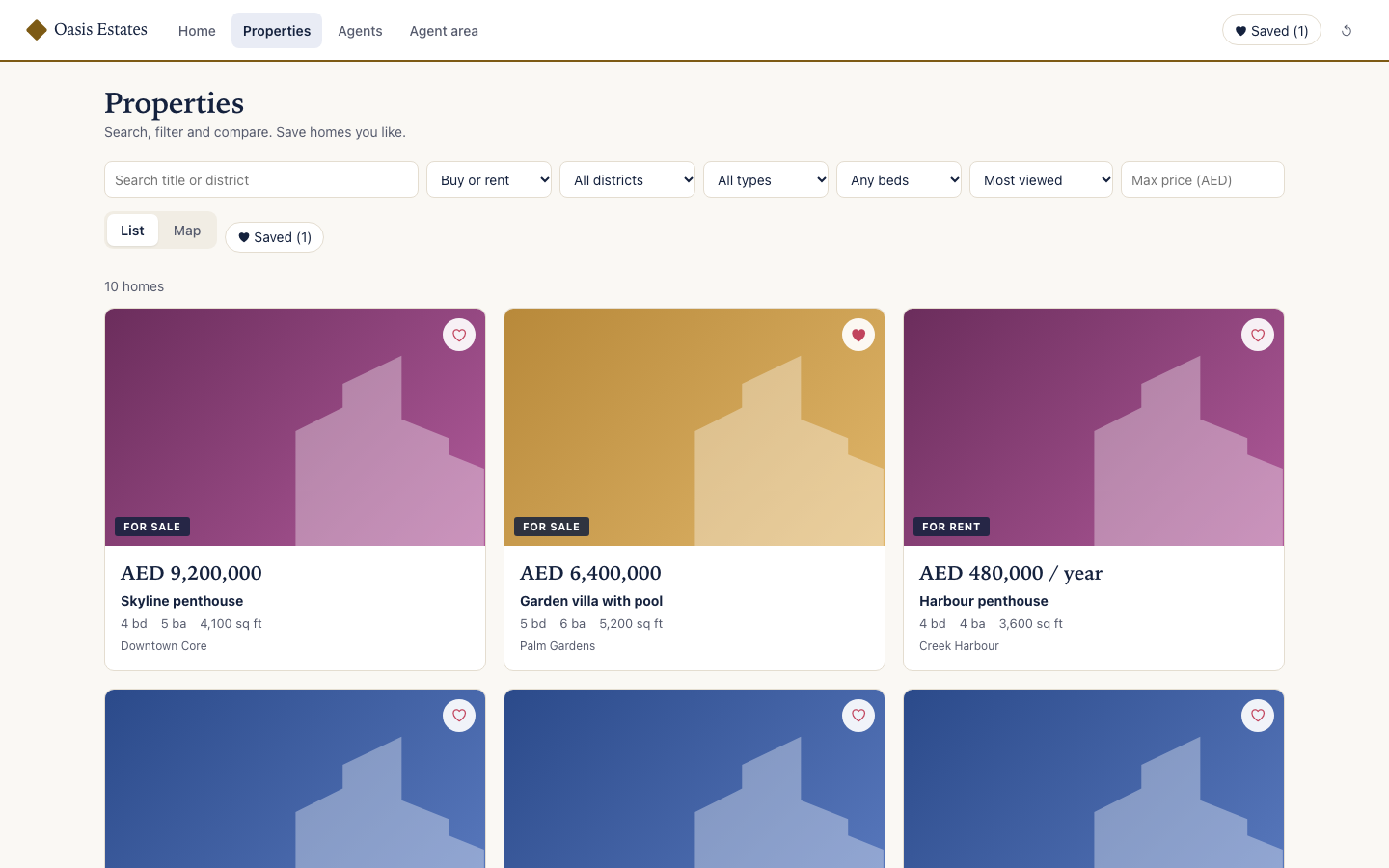
A search-led home page with featured homes and districts. Search hands your choices to the listings page.
Sample data only. Everything you change stays in your browser.
17Design system
#14213dText and structure#b8893aPrimary call to action#faf8f4Page background#2a9d8fTownhouses and positive states#c1445dSaved and alertsType. An editorial serif for prices and headlines, with a clean sans for facts. Arabic uses a matched typeface.
The stack, the architecture and how it scales.
+Technology choices
Each choice follows from what this product needs. We do not use a tool because it is fashionable.
| Layer | Choice | Why |
|---|---|---|
| Frontend | Next.js, React, TypeScript, Tailwind CSS | Server rendering for fast, indexable search pages and logical-property styling for right-to-left. |
| API | Node.js with REST | A single language across the stack and a simple public API. |
| Database | PostgreSQL with geospatial support | Relational data and map queries in one engine. |
| Search | A managed search index | Fast filtering and sorting at scale. |
| Cache and queues | Redis | Search caching and background work. |
| Cloud | AWS with Docker and CI/CD | Regional hosting and repeatable deployments. |
18Frontend architecture
Next.js with server rendering for search pages, so listings are fast and indexable. The map is a client component loaded on demand.
Internationalisation and right-to-left support are built in from the first release.
19Backend architecture
A Node.js service in TypeScript. Search is powered by a dedicated index so filtering stays fast as listings grow.
Plan rules, such as the active-listing limit, live in a domain service that every endpoint uses.
20Database architecture
PostgreSQL holds listings, agents, inquiries and plans, with geospatial support for map queries. A search index mirrors listings for fast filtering.
Redis caches popular searches and counts views in batches.
agentsidnamelicenceplanstatuspropertiesidagent_idtitletypepurposepricebedsareadistrictlocationstatusA geospatial column powers map queries
inquiriesidproperty_idnameemailmessagestagesaved_propertiesuser_idproperty_idsaved_atplansidnameactive_listing_limitmonthly_feeview_countsproperty_iddayviews21API structure
A versioned REST API under /v1. Public search endpoints are cached, and agent endpoints require authentication and enforce plan limits.
/v1/propertiesSearch with filters, sort and map bounds/v1/properties/:idListing details/v1/propertiesCreate a listing, enforcing the plan limit/v1/properties/:idEdit or change status/v1/properties/:id/inquiriesSend an inquiry to the agent/v1/inquiries/:idMove a lead between stages/v1/analytics/listingsViews and inquiries by listing/v1/agents/:idApprove an agent or change their plan22AI integrations
A model turns a sentence such as "two bedrooms near the water under 2 million" into structured filters.
Guardrail. The filters are shown to the user and can be edited, so the model never hides what it understood.
Drafts a description from the structured facts for the agent to edit.
Guardrail. Only facts the agent entered are used, and the agent approves the text.
Scores inquiries by specificity and recency to help agents choose who to answer first.
Guardrail. Scores are advisory, and every inquiry stays visible.
23Security considerations
Email and social sign-in for buyers, and multi-factor sign-in for agents and admins.
Agents can edit only their own listings. Admin actions require an admin role.
Schema validation for every request, and strict handling of uploaded images.
Output escaping on all listing text, and parameterised queries.
Rate limits and bot protection on search and inquiry endpoints.
Buyer contact details are shared only with the agent they wrote to, and handled under applicable UAE data protection rules, to be confirmed with local advisers.
Subscription payments go through a certified processor, so card details never touch our servers.
24Infrastructure and deployment
Containers on AWS in a region close to users, behind a CDN. Image processing and view counting run as background workers.
This is the proposed design. Nothing is running.
25Scalability strategy
How it would ship, and what comes after.
26Development roadmap
Phases show order, not dates. A real plan would add timing after discovery.
27Future improvements
Tell us the idea. After a 30-minute call you get a written product plan within an hour.