Patient safety
A missed allergy is the worst failure this product can have. Safety checks have to be impossible to skip.
One place for appointments, records, prescriptions and billing, with safety checks built into the daily work.
Who it is for and what goes wrong today.
01Project overview
Cedar Clinic is a product exploration by Startiffy: a clinic management platform for small and mid-sized US practices.
It covers the daily loop of a front desk and a clinician: book the visit, see the patient, record what happened, prescribe safely, and bill. The prototype is clickable and uses fictional patients only.
02Product vision
A clinic should feel calm on its busiest day: the schedule is clear, the record is one click away, and the system stops an unsafe prescription before it reaches the patient.
03Industry and target market
Healthcare (clinic software) · United States
Independent US practices often run on a patchwork of a scheduling tool, a records system and a separate billing service. Staff re-enter the same details, and information falls between tools.
The opening we explore is a single, lighter platform for small practices. We make no market-size claim. Sizing, and the regulatory review that goes with healthcare, would be the first task of real discovery.
04Problem statement
05Business challenges
A missed allergy is the worst failure this product can have. Safety checks have to be impossible to skip.
Health data is sensitive. Access, audit trails and retention have to be designed in from the first day.
Staff use it between patients. Every common task must take few steps and few decisions.
Doctors, rooms and visit types all constrain a slot. Conflicts must be caught as the booking is made.
Real claims are intricate. The first release has to be honest about what it automates and what it does not.
06Target audience
Two to fifteen clinicians, with a front desk and part-time billing support.
Need the day's queue and the patient record, and little else.
Own the schedule, staffing and the cash position of the clinic.
07User personas
Runs reception for a 6-clinician practice
General practitioner
Manages operations and billing
What we would build, and in what order.
08Proposed approach
Cedar combines scheduling, records, prescribing and billing around one patient profile, so nobody re-enters anything.
Safety is part of the workflow, not a report. The prescription form checks the patient's allergy list, and a booking cannot be saved if it conflicts with another.
Visits, notes, prescriptions and invoices in a single place.
Allergy blocks and booking conflicts stop errors at the moment of entry.
Status flows from booked to in consultation to done, visible to everyone.
09Product strategy
10Core features
Directory, search, insurance, allergies and contact details.
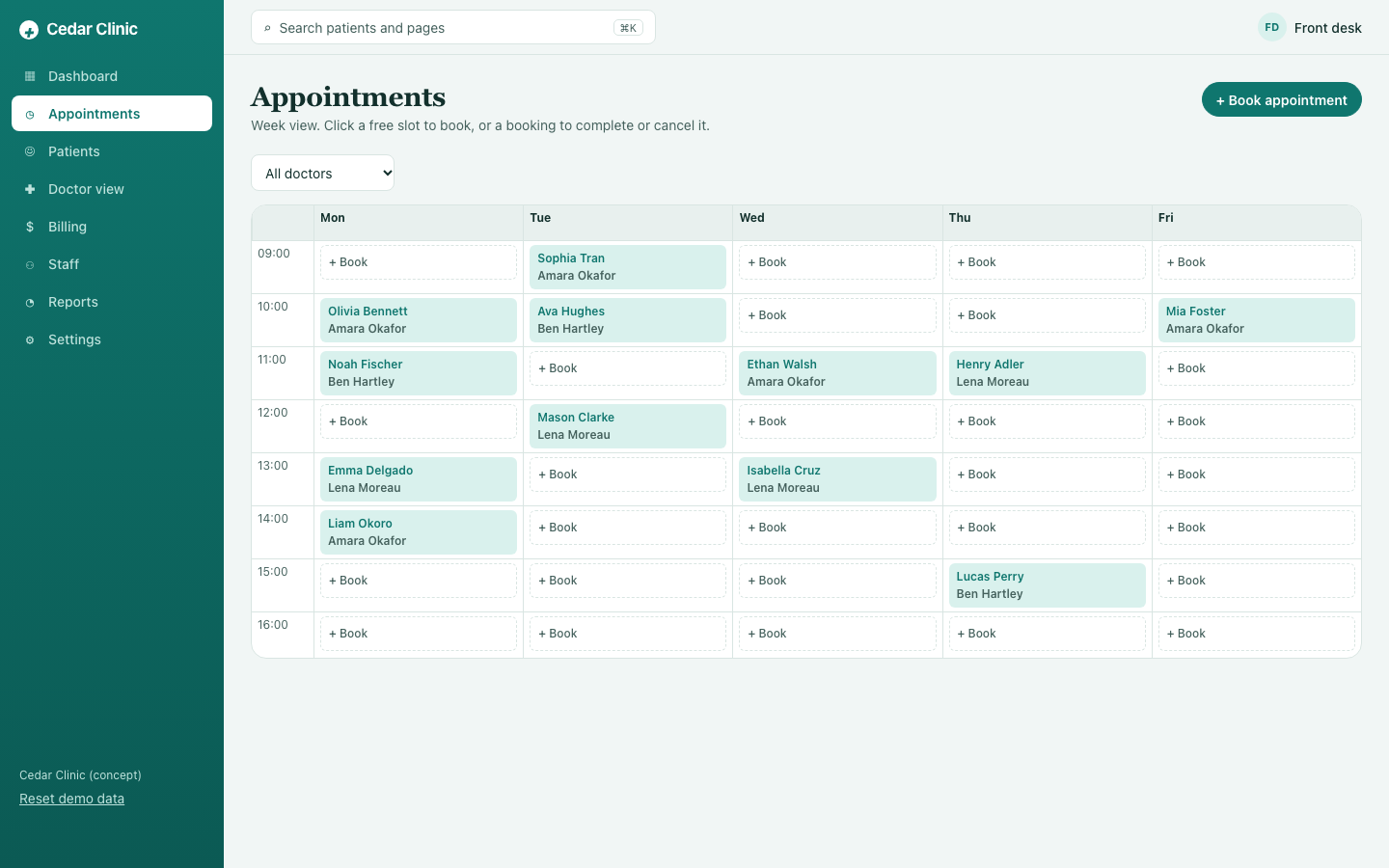
Weekly calendar with conflict checks and doctor filters.
A live list of who is waiting, in consult or done.
Visit notes by clinician, kept on the patient profile.
Prescriptions with an allergy check at the moment of entry.
Invoices, status, mark paid and CSV export.
One-click reminders for next-day visits.
Roles, availability, and reports on volume and collection.
11Feature prioritisation
| Feature | Priority | Effort | Reason |
|---|---|---|---|
| Patient directory and profile | Must | M | Everything else hangs off the patient. |
| Scheduling with conflict checks | Must | L | The core daily workflow. |
| Allergy-checked prescribing | Must | M | The key patient-safety control. |
| Audit log of record access | Must | M | Required for any real health data. |
| Billing and invoice status | Should | M | Protects the clinic's cash position. |
| Appointment reminders | Should | S | Cuts no-shows cheaply. |
| Insurance claim submission | Could | L | Complex; begin with status tracking only. |
| Patient portal | Could | L | Valuable, but builds on a stable core. |
Effort is a relative size (S, M, L), not a time estimate. A real plan would size work after discovery.
12User journeys
Structure, wireframes and the working prototype.
13Information architecture
14Wireframes
Low-fidelity sketches settle structure and priority before colour and type enter the discussion.
15UI/UX design process
Interview front desk staff and clinicians, map their day, and agree what the first release must prove.
Write the product plan, the data model and the rules. Decide how we will handle consent, access control and audit before any screen is drawn.
Sketch wireframes, build the design system, and test a clickable prototype with real users.
Ship in weekly cycles, each ending in something a user can try.
Onboard a small group first. We watch the real schedule and the safety checks and fix what confuses people before widening access.
Add integrations and intelligence once real usage shows where they pay off.
16Final interface
This is the working prototype, not a picture. Pick a screen, resize the preview, and use the controls. 10 screens are connected, and every filter, form and chart responds.
The clinic's public page, with a clear path to booking and to the staff dashboard.
Sample data only. Everything you change stays in your browser.
17Design system
#0f766ePrimary actions and navigation#f1f6f5Page background#2563ebInformation and in-consult status#d97706Waiting and pending#b91c1cAllergies and overdueType. Serif display headings with a system sans-serif for body and data. Tabular numerals for money.
The stack, the architecture and how it scales.
+Technology choices
Each choice follows from what this product needs. We do not use a tool because it is fashionable.
| Layer | Choice | Why |
|---|---|---|
| Frontend | Next.js, React, TypeScript, Tailwind CSS | Fast, accessible interfaces with strong typing. |
| Backend | Java with Spring Boot | Mature security, validation and transaction tooling for a regulated domain. |
| Database | PostgreSQL | Relational integrity, constraints that prevent double booking, and row-level security. |
| Queue and cache | Redis | Reminder jobs and short-lived caches. |
| Cloud | AWS with Docker and CI/CD | Healthcare-ready services and repeatable, reviewed deployments. |
| AI | Claude behind a policy layer | Drafting help with logging and a human always in the loop. |
18Frontend architecture
A Next.js application in TypeScript. Server components render lists and reports, and client components handle the calendar and forms.
The prototype is dependency-free and demonstrates the interaction design.
19Backend architecture
A Spring Boot service in Java, organised into modules for patients, scheduling, clinical records, prescribing and billing. Java gives strong typing and mature security tooling, which suits a regulated domain.
Background jobs send reminders and prepare invoices.
20Database architecture
PostgreSQL is the system of record. Clinical notes are append-only with versions, so history is never overwritten.
Every row carries a clinic id and an access policy.
patientsidclinic_idnamedobinsuranceallergiesappointmentsidpatient_idclinician_idstarts_atstatusreasonA unique constraint on clinician and time prevents double booking
clinical_notesidpatient_idauthor_idbodyversioncreated_atprescriptionsidpatient_iddrugdosedaysprescriber_idinvoicesidpatient_idamountstatusdue_ataudit_logidactor_idactionpatient_idatEvery read and write of a record is logged
21API structure
A versioned REST API. Every request is authenticated, authorised by role, and written to the audit log.
/v1/patientsSearch and list patients/v1/patients/:idA patient profile with allergies/v1/appointmentsBook a visit, rejecting conflicts/v1/appointments/:idChange status or cancel/v1/patients/:id/notesAdd a clinical note/v1/patients/:id/prescriptionsPrescribe, with allergy check/v1/invoicesList invoices by status/v1/invoices/:id/paymentsRecord a payment22AI integrations
A model turns clinician dictation into a structured draft note for review.
Guardrail. The clinician edits and signs every note. The model never writes to the record alone.
A simple model flags visits likely to be missed so the front desk can confirm them.
Guardrail. Used only to prioritise reminders, never to deny or reschedule care.
Retrieval over a licensed drug reference to suggest interactions to check.
Guardrail. Hints support, and never replace, the rule-based allergy and interaction checks.
23Security considerations
Single sign-on or email with mandatory multi-factor sign-in for staff.
Role-based access with least privilege. Billing staff cannot read clinical notes.
Every access to a patient record is logged, and the log cannot be edited.
TLS in transit, and encryption at rest with managed keys.
Server-side schema validation and output escaping on all clinical text.
Held in a secrets manager and rotated, never stored in code.
Business associate agreements with providers, and a formal HIPAA risk assessment before any real patient data is stored.
24Infrastructure and deployment
Containers on AWS in a private network, with automated builds and reviewed deployments. This describes the proposed design, and nothing is running.
Backups are encrypted and restore-tested.
25Scalability strategy
How it would ship, and what comes after.
26Development roadmap
Phases show order, not dates. A real plan would add timing after discovery.
27Future improvements
Tell us the idea. After a 30-minute call you get a written product plan within an hour.