Scores people do not trust
A black-box score gets ignored. Reps need to see why a lead ranks where it does, and change the rules.
A CRM that scores every lead from rules you set, drafts the follow-up, and shows a forecast you can defend.
Who it is for and what goes wrong today.
01Project overview
Meridian CRM is a product exploration by Startiffy: a CRM for small US sales teams that uses AI to answer one question every morning, "which deal should I call next?"
This page walks through how we would take the idea from strategy to launch: who it is for, what it does, how it is designed, and how it is built. The interface is a working prototype with sample data, so you can click through it rather than look at pictures of it.
02Product vision
A small sales team should work with the clarity of a large one: every lead ranked by a score it can explain, every follow-up started for it, and a forecast it can defend to a board or a bank.
03Industry and target market
Sales software (B2B SaaS) · United States
US small and mid-sized sales teams usually choose between two kinds of CRM. Large suites cover everything and take weeks to configure. Lightweight tools are quick to start and stop helping once the team has more than a few hundred leads.
The opening we explore sits between them: a CRM that is useful on day one, with a scoring and drafting layer that makes the next action obvious. We make no market-size claim here. Sizing would be the first task of a real discovery phase.
04Problem statement
05Business challenges
A black-box score gets ignored. Reps need to see why a lead ranks where it does, and change the rules.
If logging a deal takes longer than the call, the CRM goes stale and every report is wrong.
A draft email that sounds wrong damages a relationship. The assistant must help, and a human must stay in control.
A small team cannot spend a month on setup. Onboarding has to finish in minutes, with sensible defaults.
A forecast built on made-up probabilities misleads. The method has to be simple enough to explain.
06Target audience
Two to ten people selling a product the founder knows deeply, with no sales operations role.
Own a number and need a view of risk without reading every deal.
Own a book of leads and want to start each morning with a clear order of work.
07User personas
Founder of a 9-person software company
Leads a team of five reps
Account executive with 60 open leads
What we would build, and in what order.
08Proposed approach
Meridian combines a familiar CRM core (leads, contacts, pipeline) with two assistants that save time, and a forecast that shows its working.
Every AI feature is explainable and optional. Scores come from five visible factors with weights the team controls. Drafts are always editable, and nothing sends without a person pressing the button.
Fit, budget, timeline, engagement and recency, each with adjustable weight.
Goal and tone in, an editable first draft out.
Value multiplied by stage probability, grouped by expected close.
09Product strategy
10Core features
A 0 to 100 score from five weighted factors, with a breakdown on every lead.
A Kanban board with drag and drop and a keyboard-accessible move menu.
People and companies with deal value rolled up per company.
Schedule a short follow-up sequence from any draft.
Drafts by goal and tone, grounded in the lead record, always editable.
Weighted pipeline by stage and expected close month.
Roles, notes on every lead, a shared activity feed.
Revenue trends, a conversion funnel, source performance, CSV export.
11Feature prioritisation
| Feature | Priority | Effort | Reason |
|---|---|---|---|
| Leads, contacts and pipeline | Must | M | The core loop does not exist without them. |
| Rules-based lead scoring | Must | M | The main reason to choose this product. |
| Email and calendar sync | Must | L | Without it, activity data is typed by hand. |
| Forecast | Should | S | Cheap once stages and values exist. |
| AI email drafts | Should | M | Strong value, and safe because a human reviews every draft. |
| Follow-up sequences | Should | M | Depends on email sync and drafting. |
| Model-based scoring signals | Could | L | Wait for real data before adding them. |
| Custom dashboards | Could | L | Fixed reports cover early needs. |
Effort is a relative size (S, M, L), not a time estimate. A real plan would size work after discovery.
12User journeys
Structure, wireframes and the working prototype.
13Information architecture
14Wireframes
Low-fidelity sketches settle structure and priority before colour and type enter the discussion.
15UI/UX design process
Interview target users, map the daily loop of a rep and a manager, and agree what the first release must prove.
Write the product plan, user journeys and the scoring method. Decide the data model before screens.
Sketch wireframes, build a design system, and test a clickable prototype with real users.
Ship in weekly cycles, with each cycle ending in something a user can try.
Onboard a small set of teams, watch real usage, and fix what confuses people first.
Add integrations, model-based signals and reporting once real data justifies them.
16Final interface
This is the working prototype, not a picture. Pick a screen, resize the preview, and use the controls. 11 screens are connected, and every filter, form and chart responds.
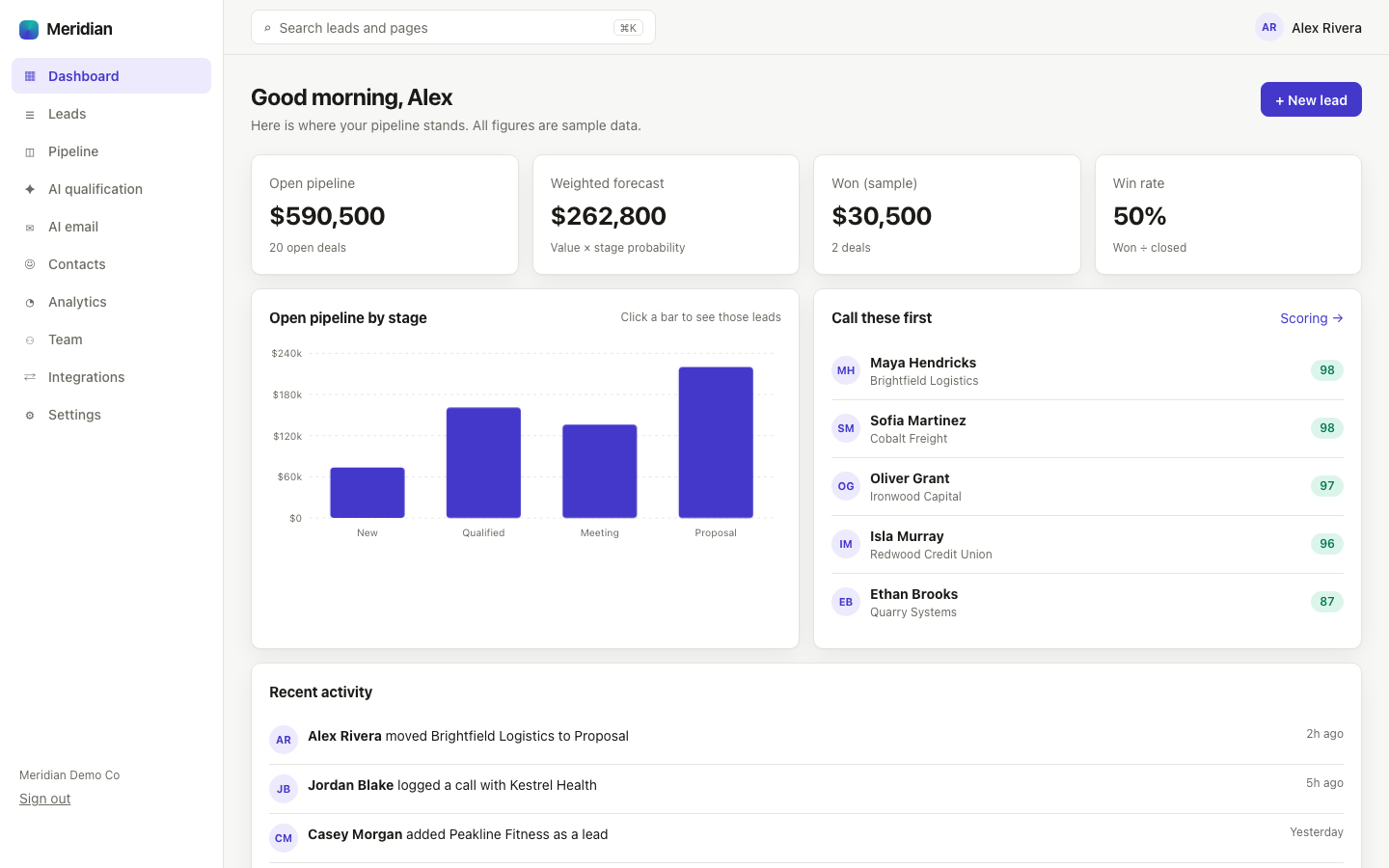
Pipeline value, weighted forecast and the five leads to call first. Click a bar to filter the leads list.
Sample data only. Everything you change stays in your browser.
17Design system
#4338caPrimary actions and selection#047857Hot leads, success#b45309Warm leads, caution#475569Cold leads, neutral#b91c1cDestructive actions, errorsType. System UI sans-serif at 14px body, 24px page titles, tabular numerals for money and counts.
The stack, the architecture and how it scales.
+Technology choices
Each choice follows from what this product needs. We do not use a tool because it is fashionable.
| Layer | Choice | Why |
|---|---|---|
| Frontend | Next.js, React, TypeScript, Tailwind CSS | Fast server-rendered pages, strong typing, and a design system that maps to tokens. |
| API | Node.js with REST | One language across the stack for a small team, and a simple API for customers to learn. |
| Database | PostgreSQL | Relational data, reporting queries and row-level security. |
| Queue and cache | Redis | Background jobs and dashboard caching. |
| AI | Claude and OpenAI behind one interface | Choose per task, compare quality and cost, and avoid lock-in. |
| Cloud | AWS with Docker and CI/CD | Mature managed services and repeatable deployments. |
18Frontend architecture
The production app would be a Next.js application in TypeScript, with server-rendered shells and client components only where interaction needs them.
The prototype on this page is deliberately dependency-free, so it loads fast and shows the interaction design without a build step.
19Backend architecture
A modular Node.js service exposes a REST API. Modules (leads, pipeline, scoring, messaging, analytics) share one database but keep their own code boundaries, so the team can split them later if load demands it.
Background work, such as email sync and scheduled follow-ups, runs on a queue so requests stay fast.
20Database architecture
PostgreSQL is the system of record, because the data is relational and reports need joins and aggregates. Redis holds queues and short-lived caches.
Every table carries a workspace id and queries always filter by it, so one team can never read another team's data.
workspacesidnameplancreated_atusersidworkspace_idemailrolecompaniesidworkspace_idnameindustryemployeesleadsidworkspace_idcompany_idowner_idstagevaluesourcetimelinebudget_confirmedlast_touch_atScores are computed, not stored, so weight changes apply instantly
activitiesidlead_idtypebodyactor_idcreated_atscoring_weightsworkspace_idfactorweightemail_draftsidlead_idgoaltonebodystatus21API structure
A versioned REST API under /v1. Responses are paginated with cursors, errors share one envelope, and every write is idempotent where it can be.
/v1/leadsList leads with search, filters, sort and cursor pagination/v1/leadsCreate a lead/v1/leads/:idUpdate fields or move the stage/v1/leads/:idDelete a lead and its notes/v1/leads/:id/scoreScore and factor breakdown for one lead/v1/scoring/weightsChange the five scoring weights/v1/leads/:id/draftsGenerate an email draft for a goal and tone/v1/analytics/forecastWeighted pipeline grouped by expected close22AI integrations
A language model receives the lead record, the goal and the tone, and returns a draft. The prompt is versioned and the draft is stored.
Guardrail. A person always reviews and sends. The model never has send access.
Launch uses transparent rules. A later release adds a model-based read of message sentiment as a sixth, clearly labelled factor.
Guardrail. Model signals are shown beside the rules and can be switched off.
Retrieval over a lead's emails and notes produces a short summary at the top of the lead page.
Guardrail. Summaries link back to the source messages so claims can be checked.
23Security considerations
Email sign-in with MFA, short-lived access tokens and rotating refresh tokens.
Role checks (admin, rep, viewer) on the server for every write. Hiding a button is never the control.
Every query is scoped by workspace id, and row-level security in PostgreSQL backs it up.
Schema validation on every request, parameterised queries, and output escaping so stored text cannot run as script.
Integration tokens are encrypted at rest and kept in a secrets manager, never in the repository.
SameSite cookies and CSRF tokens on state-changing requests.
Only the fields a prompt needs are sent to a model provider, and customer data is excluded from provider training through contract settings.
24Infrastructure and deployment
The app runs in containers on AWS, deployed through a pipeline that builds, tests and ships automatically. Every change is reviewed before it reaches production.
This is the proposed design. No infrastructure for this concept exists or is running.
25Scalability strategy
How it would ship, and what comes after.
26Development roadmap
Phases show order, not dates. A real plan would add timing after discovery.
27Future improvements
Tell us the idea. After a 30-minute call you get a written product plan within an hour.