Practice that feels real
Timers, negative marking and a question palette must match the exam experience.
Courses, a video player with notes, timed mock tests with negative marking, and the tools instructors use to build and teach.
Who it is for and what goes wrong today.
01Project overview
Scholr Learn is a product exploration by Startiffy: a learning platform for students preparing for exams in India and the United States.
Students watch lessons, take timed mock tests and see which topics need work. Instructors build courses and maintain a question bank, and administrators track revenue. The prototype is fully clickable with invented courses and learners.
02Product vision
Make preparation feel like progress: clear lessons, honest practice, and feedback that tells a student exactly what to study next.
03Industry and target market
Education technology (LMS) · India and the United States
Exam preparation in India and the US is large and highly competitive. Students mix video lessons, coaching centres and practice books, with little connection between them.
The opening we explore is a platform that joins lessons and exam-style practice, with topic-level feedback. We make no market-size claim. Content partnerships and local exam rules would be the first discovery topics.
04Problem statement
05Business challenges
Timers, negative marking and a question palette must match the exam experience.
Students in India and the US connect on very different networks. Playback has to adapt.
Pricing, tax, payments and content differ between India and the US.
Questions must not leak, and attempts must be recorded reliably.
Building a course should take hours, not weeks.
06Target audience
Mostly mobile, preparing for school and entrance exams.
Subject experts who teach live and record lessons.
Run users, content approval and revenue.
07User personas
Preparing for an engineering entrance exam
Physics teacher with 300 students
Runs operations
What we would build, and in what order.
08Proposed approach
A platform where lessons, notes and tests live together. A mock test records which topic every question belongs to, so the results screen can say exactly what to study next.
Instructors work in the same data: a question written once feeds many tests, and every course shows its lesson count and completion.
Lessons, notes and tests share one progress record.
Each test breaks results down by topic.
A course builder and a reusable question bank.
09Product strategy
10Core features
Modules, lessons and publishing rules.
Enrolment, progress and certificates.
Playback with speed control, seeking and notes.
A weekly schedule and join links.
Countdown, palette, flagging and negative marking.
Searchable questions with topic and difficulty.
Accuracy by topic and score trends.
Courses, users and revenue in two currencies.
11Feature prioritisation
| Feature | Priority | Effort | Reason |
|---|---|---|---|
| Courses, lessons and playback | Must | L | The core learning experience. |
| Mock tests with scoring | Must | L | The key differentiator. |
| Question bank | Must | M | Feeds every test. |
| Progress and certificates | Should | S | Motivation and proof. |
| Live classes | Should | M | Builds a habit and community. |
| Payments in INR and USD | Must | M | Required to sell. |
| Revenue analytics | Should | S | Needed by administrators. |
| Adaptive practice | Could | L | Needs real answer data first. |
Effort is a relative size (S, M, L), not a time estimate. A real plan would size work after discovery.
12User journeys
Structure, wireframes and the working prototype.
13Information architecture
14Wireframes
Low-fidelity sketches settle structure and priority before colour and type enter the discussion.
15UI/UX design process
Interview students and instructors, map their day, and agree what the first release must prove.
Write the product plan, the data model and the rules. Decide how we will handle exam fidelity, content rights and integrity before any screen is drawn.
Sketch wireframes, build the design system, and test a clickable prototype with real users.
Ship in weekly cycles, each ending in something a user can try.
Onboard a small group first. We watch completion, test attempts and where students stop and fix what confuses people before widening access.
Add integrations and intelligence once real usage shows where they pay off.
16Final interface
This is the working prototype, not a picture. Pick a screen, resize the preview, and use the controls. 12 screens are connected, and every filter, form and chart responds.
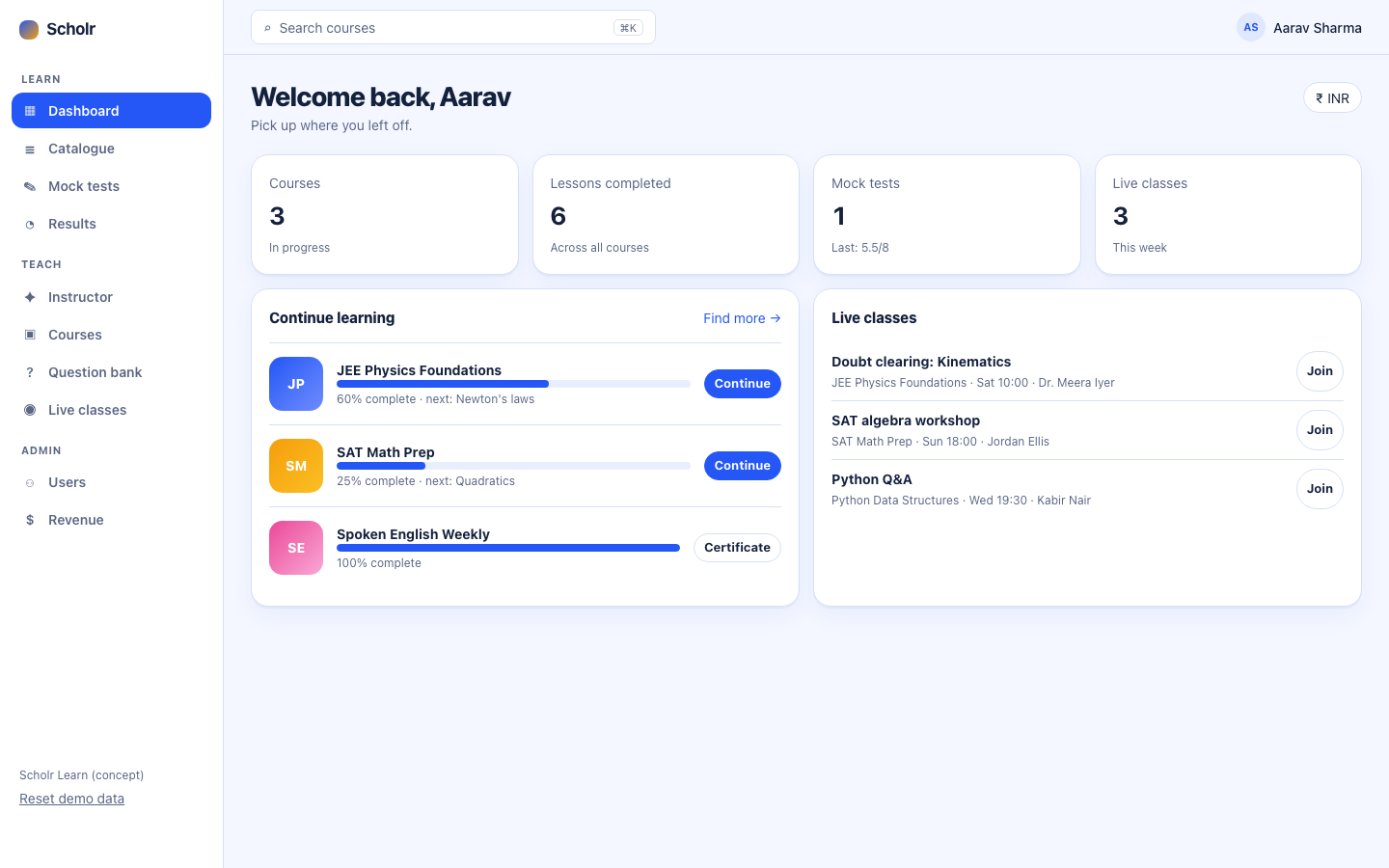
The platform page for students and instructors.
Sample data only. Everything you change stays in your browser.
17Design system
#2457f5Primary actions#f59e0bHighlights and effort#f4f7ffPage background#047857Completed#ec4899Flags and alertsType. A friendly geometric sans with heavy headings, and tabular numerals for scores and timers.
The stack, the architecture and how it scales.
+Technology choices
Each choice follows from what this product needs. We do not use a tool because it is fashionable.
| Layer | Choice | Why |
|---|---|---|
| Frontend | Next.js, React, TypeScript, Tailwind CSS | Mobile-first pages and a focused exam interface. |
| Backend | Java with Spring Boot | Strong transaction and scoring logic, and good tooling for payments and reporting. |
| Database | PostgreSQL | Relational data and rich analytics queries. |
| Cache | Redis | Exam timers and short-lived state. |
| Video | Managed transcoding and a CDN | Adaptive delivery to varied networks. |
| Cloud | AWS with Docker and CI/CD | Regions in both markets and elastic exam capacity. |
18Frontend architecture
A Next.js application tuned for mobile, with adaptive video streaming and offline-friendly lesson notes. The exam screen is a focused client component that keeps answers safe if the connection drops.
The prototype simulates playback to show the interaction design.
19Backend architecture
A Spring Boot service in Java organised into modules for catalogue, enrolment, assessment, payments and analytics. Assessment runs scoring on the server so a student cannot alter a result.
Video processing and certificate generation are background jobs.
20Database architecture
PostgreSQL stores courses, enrolments, questions and attempts. Each answer is a row, so analytics can break results down by topic and over time.
Redis holds timers and short-lived exam state.
coursesidtitlecategorylevelmarketprice_usdstatuslessonsidmodule_idtitleminutesvideo_refenrolmentsstudent_idcourse_idstarted_atlesson_progressstudent_idlesson_idcompleted_atquestionsidsubjecttopictextoptionsanswerdifficultyattemptsidstudent_idtest_idscorestarted_atsubmitted_atattempt_answersattempt_idquestion_idchosencorrectOne row per answer powers topic analytics
21API structure
A versioned REST API. Exam endpoints are time-aware and idempotent, so a retry after a dropped connection is safe.
/v1/coursesCatalogue with filters/v1/courses/:id/enrolmentsEnrol a student/v1/lessons/:id/progressRecord completion/v1/tests/:id/attemptsStart a timed attempt/v1/attempts/:id/answersSave answers as the student works/v1/attempts/:id/submitSubmit and score/v1/questionsAdd a question to the bank/v1/analytics/revenueRevenue by course and market22AI integrations
From answer history, the system suggests the lessons and practice questions for each weak topic.
Guardrail. Suggestions explain the evidence, such as "you missed 3 of 4 forces questions".
A model drafts practice questions from a lesson transcript.
Guardrail. Every question is reviewed by an instructor before it reaches the bank.
Retrieval over course material answers student questions with a reference to the lesson.
Guardrail. It cites the lesson and says when the material does not cover the question.
23Security considerations
Email and social sign-in for students, with multi-factor sign-in for instructors and admins.
Students see only enrolled content. Instructors edit only their own courses.
Questions are served one at a time, scoring is server-side, and attempts are rate limited and logged.
Signed, expiring video URLs and watermarking of premium content.
Course text and student notes are escaped everywhere they are shown.
Parental consent flows for under-age students, and data handling designed for both Indian and US rules, to be confirmed with advisers.
Hosted payment pages for each market keep card details away from our servers.
24Infrastructure and deployment
Containers on AWS with regions in India and the US. Video is stored in object storage and delivered through a CDN with adaptive bitrates.
This is the proposed design, and nothing is running.
25Scalability strategy
How it would ship, and what comes after.
26Development roadmap
Phases show order, not dates. A real plan would add timing after discovery.
27Future improvements
Tell us the idea. After a 30-minute call you get a written product plan within an hour.