A checkout people finish
Every extra field and every unclear cost costs sales. Validation must help, not nag.
A storefront with a working basket, discount codes and checkout, plus the admin that runs stock, orders and sales.
Who it is for and what goes wrong today.
01Project overview
Northlane Goods is a product exploration by Startiffy: an online store and admin for a small UK retailer.
A shopper can browse, fill a basket, apply a code and check out. The retailer can manage products, stock and orders. The prototype follows the real flow, but no payment is taken and every product is invented.
02Product vision
A small shop should be able to run a store as polished as a large one, with the same care over every detail from the product page to the parcel.
03Industry and target market
Retail (e-commerce) · United Kingdom
UK shoppers expect fast pages, clear delivery costs and easy returns. Small retailers often rely on a hosted platform with limited control over the checkout and the back office.
The opening we explore is a lighter platform designed around a small catalogue and a small team. We make no market claim, and a real build would start with the retailer's own numbers.
04Problem statement
05Business challenges
Every extra field and every unclear cost costs sales. Validation must help, not nag.
Selling something that is not there is the fastest way to lose a customer.
Card data must never touch the retailer's own systems, and VAT must be shown correctly.
Most traffic is on phones. Pages have to be light and the basket persistent.
Small teams need orders, stock and discounts without a training course.
06Target audience
Mostly mobile, comparing a few products and wanting clear delivery costs.
Run the catalogue, set prices and discounts, and read sales.
Pick, pack and ship orders against live stock.
07User personas
Buys homeware a few times a year
Runs a 3-person shop
Packs and ships orders
What we would build, and in what order.
08Proposed approach
A storefront and an admin that share one catalogue and one stock count. Placing an order reduces stock, cancelling one returns it, and the basket never lets a shopper buy more than exists.
Totals, delivery and VAT are shown the same way in the basket, at checkout and on the order, so there are no surprises.
Orders, cancellations and adjustments all update the same number.
Delivery, discounts and VAT are visible from the basket onward.
Orders, stock, products and codes in a handful of screens.
09Product strategy
10Core features
Search, categories, filters, sale prices and stock status.
Quantity changes with stock limits and a visible total.
Address, delivery choice and payment with inline validation.
A hosted payment form, so cards stay with the provider.
Percentage and free-delivery codes with expiry.
Standard and express, free over a threshold.
Live stock, low-stock alerts and an order status flow.
Accounts, order history, top products and revenue.
11Feature prioritisation
| Feature | Priority | Effort | Reason |
|---|---|---|---|
| Catalogue, basket and checkout | Must | L | The store does not exist without them. |
| Hosted payments | Must | M | Takes card data out of scope. |
| Stock tied to orders | Must | M | Prevents overselling. |
| Order management | Must | M | Needed to fulfil. |
| Discount codes | Should | S | Common promotion tool. |
| Delivery rules | Should | M | Clarity at checkout. |
| Analytics | Should | S | Guides what to stock. |
| Recommendations | Could | M | Wait for real browsing data. |
Effort is a relative size (S, M, L), not a time estimate. A real plan would size work after discovery.
12User journeys
Structure, wireframes and the working prototype.
13Information architecture
14Wireframes
Low-fidelity sketches settle structure and priority before colour and type enter the discussion.
15UI/UX design process
Interview shoppers and shop staff, map their day, and agree what the first release must prove.
Write the product plan, the data model and the rules. Decide how we will handle stock accuracy, payments and tax before any screen is drawn.
Sketch wireframes, build the design system, and test a clickable prototype with real users.
Ship in weekly cycles, each ending in something a user can try.
Onboard a small group first. We watch the checkout funnel and stock levels and fix what confuses people before widening access.
Add integrations and intelligence once real usage shows where they pay off.
16Final interface
This is the working prototype, not a picture. Pick a screen, resize the preview, and use the controls. 11 screens are connected, and every filter, form and chart responds.
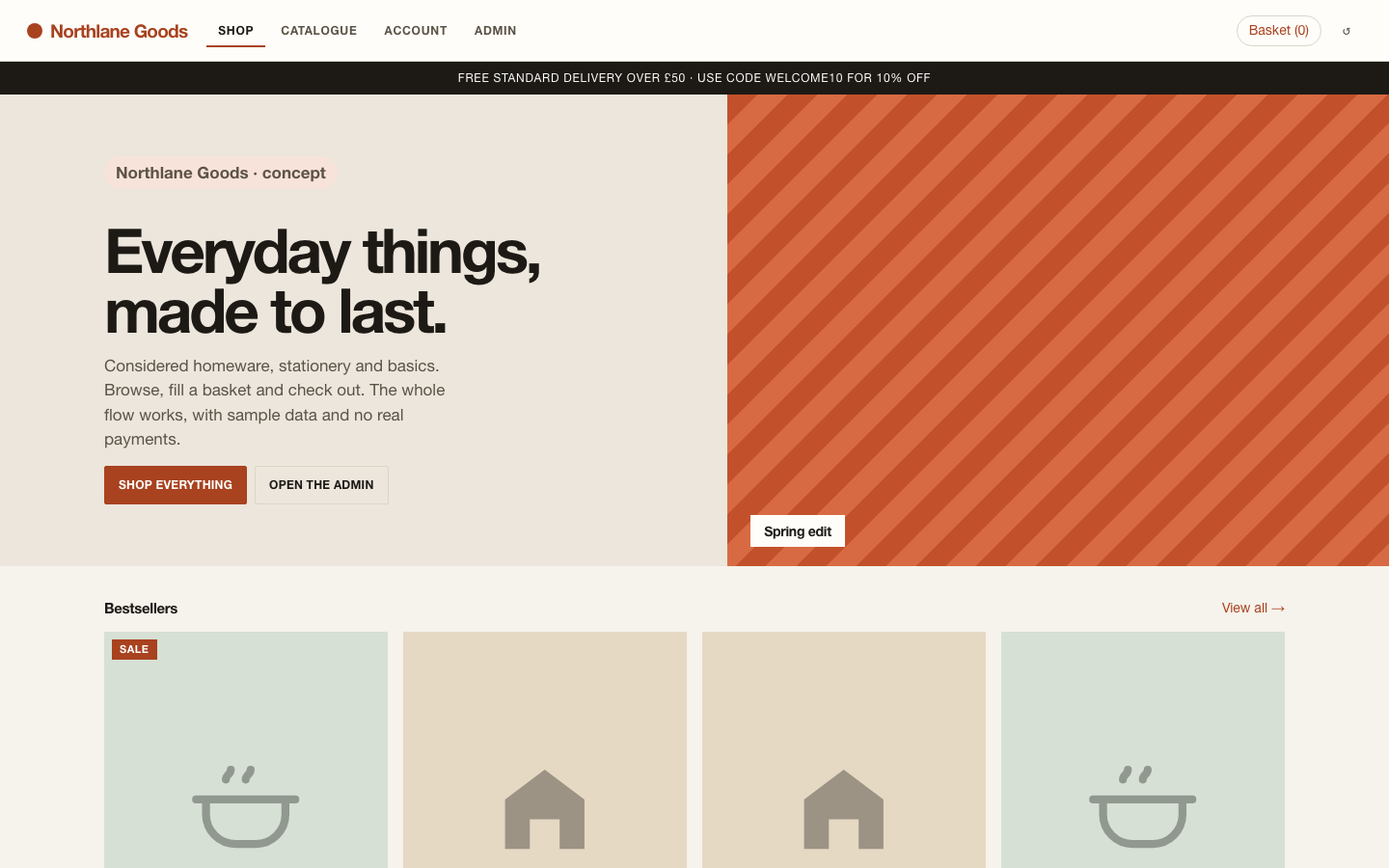
The home page with a promotion bar, a hero and bestsellers.
Sample data only. Everything you change stays in your browser.
17Design system
#1d1a16Text and primary buttons#c2512bAccents and sale tags#f6f2ecPage background#5b7b6aIn stock and success#c9a227Low stockType. A tight grotesque sans with strong weights for headings, and tabular numerals for prices.
The stack, the architecture and how it scales.
+Technology choices
Each choice follows from what this product needs. We do not use a tool because it is fashionable.
| Layer | Choice | Why |
|---|---|---|
| Frontend | Next.js, React, TypeScript, Tailwind CSS | Fast server-rendered pages and a maintainable design system. |
| API | Node.js with REST | One language across the stack and a simple, well-understood interface. |
| Database | PostgreSQL | Transactions that keep stock and orders consistent. |
| Cache and queues | Redis | Catalogue caching, guest baskets and background jobs. |
| Payments | A hosted payment provider | Keeps card data out of our systems. |
| Cloud | AWS with Docker and CI/CD | Scales for peaks and deploys safely. |
18Frontend architecture
Next.js with server rendering and image optimisation for fast product pages. The basket is held on the server for signed-in shoppers and mirrored locally for guests.
The checkout is a small, focused flow with no distractions.
19Backend architecture
A Node.js service in TypeScript with modules for catalogue, basket, orders, stock and discounts. Order placement runs in a database transaction that checks and reduces stock together.
Payment is handled through a hosted provider; the service receives confirmations by webhook.
20Database architecture
PostgreSQL holds products, stock, orders and discounts. Stock changes are recorded as movements, so every number can be explained.
Redis caches the catalogue and stores baskets for guests.
productsidnamecategorypricewas_pricestatusstock_levelsproduct_idon_handChanged only through stock_movements
stock_movementsidproduct_iddeltareasonatordersidcustomer_idstatussubtotaldiscountshippingtotalorder_linesorder_idproduct_idqtyunit_pricediscountscodekindvalueactiveuses21API structure
A versioned REST API. Prices and totals are always computed on the server.
/v1/productsSearch and filter the catalogue/v1/basket/itemsAdd an item, checking stock/v1/basket/discountApply a code/v1/checkoutCreate an order and a payment session/v1/webhooks/paymentsConfirm payment/v1/orders/:idChange order status/v1/stock/adjustmentsRestock or correct stock/v1/analytics/salesRevenue and top products22AI integrations
A model drafts descriptions from structured attributes for the owner to edit.
Guardrail. The owner reviews every description, and claims such as materials come only from entered data.
Embedding-based search understands queries like "something for a small kitchen".
Guardrail. Results always show real stock and price, and the shopper can fall back to filters.
Drafts answers about delivery and returns from the shop's own policies.
Guardrail. Answers cite the policy page, and unusual cases go to a person.
23Security considerations
A hosted payment form keeps card numbers away from our servers, which keeps the store out of the heaviest card-data obligations.
Email sign-in for customers, with multi-factor sign-in for staff.
Admin routes require a staff role, and customers can read only their own orders.
Server-side validation of every field, including postcodes, quantities and codes.
SameSite cookies and CSRF tokens on state-changing requests.
The server recalculates every total. A modified browser request cannot change a price.
Customer data is handled in line with UK GDPR, with clear retention rules.
24Infrastructure and deployment
Containers on AWS behind a CDN, with images served from object storage. Seasonal spikes are handled by scaling the web tier and caching the catalogue.
This is the proposed design, and nothing is running.
25Scalability strategy
How it would ship, and what comes after.
26Development roadmap
Phases show order, not dates. A real plan would add timing after discovery.
27Future improvements
Tell us the idea. After a 30-minute call you get a written product plan within an hour.