Answers that are right
A wrong answer is worse than no answer. Responses must come from approved content and cite it.
A support inbox with a chatbot that answers from your own knowledge base, cites its sources, and hands over to a person when it should.
Who it is for and what goes wrong today.
01Project overview
Relay Support is a product exploration by Startiffy: a customer support platform designed around an AI assistant that works with people instead of replacing them.
The assistant answers from the company's own articles and documents, shows its source, and hands the conversation to a person when it is unsure or the customer is frustrated. The prototype runs real retrieval and sentiment rules in your browser, without calling a language model.
02Product vision
Customers get a correct answer in seconds when one exists, and a human who already knows the story when it does not.
03Industry and target market
Customer support software (B2B SaaS) · Worldwide
Support teams are under pressure to answer faster with the same headcount. Many bots deflect customers instead of helping them, and customers notice.
The opening we explore is a trustworthy assistant: grounded in the company's own knowledge, honest about uncertainty, and tightly integrated with a human inbox. We make no claims about resolution rates, which would be measured with a real pilot.
04Problem statement
05Business challenges
A wrong answer is worse than no answer. Responses must come from approved content and cite it.
The assistant needs a calibrated sense of when it does not know, and a smooth path to a person.
Articles change. The system must show gaps and make fixing them easy.
Email, chat and messaging must feed one conversation view.
Customer messages can hold personal data. What is sent to a model must be limited and logged.
06Target audience
Answer many conversations a day across channels.
Own quality, staffing and the knowledge base.
Want a quick, correct answer, or a person.
07User personas
Runs a 6-person team
Handles email and chat
Needs help with her account
What we would build, and in what order.
08Proposed approach
Relay puts a retrieval-based assistant in front of a human inbox. The assistant answers only when its confidence clears a threshold the team controls, shows the source, and otherwise passes the thread to a person with the context attached.
Workflows decide what happens next, such as escalating a frustrated customer, and every rule can be tested on a sample message before it goes live.
Replies come from your articles and documents, with a source.
Low confidence or negative sentiment routes to a person.
Workflows show exactly what they would do on any message.
09Product strategy
10Core features
Answers with citations, and hands over when unsure.
Articles that the assistant and agents both use.
Retrieval over articles and uploaded documents.
Upload text, chunk it and index it instantly.
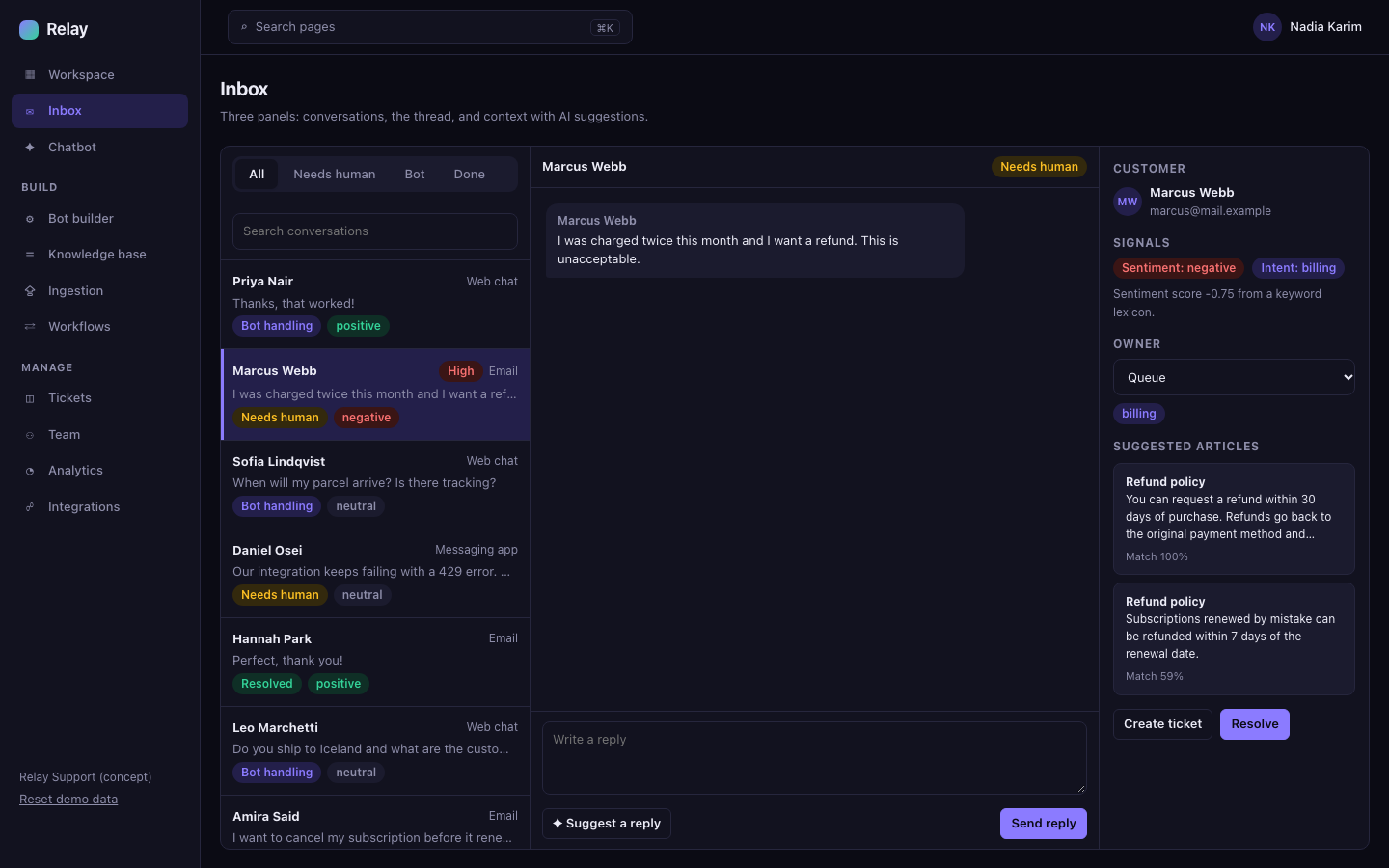
Conversations, thread and context in one view.
A smooth transfer with the full thread.
Rules on sentiment, intent, confidence and keywords.
Flag frustration and report on intents and channels.
11Feature prioritisation
| Feature | Priority | Effort | Reason |
|---|---|---|---|
| Inbox with threads and assignment | Must | L | The agents' daily tool. |
| Knowledge base and retrieval | Must | L | Powers every answer. |
| Chatbot with citations and handover | Must | L | The headline capability. |
| Confidence threshold | Must | S | Controls the main risk. |
| Workflows | Should | M | Automates routing safely. |
| Knowledge gap report | Should | S | Keeps content fresh. |
| Analytics | Should | M | Proves value to leads. |
| Voice channel | Could | L | A different problem space. |
Effort is a relative size (S, M, L), not a time estimate. A real plan would size work after discovery.
12User journeys
Structure, wireframes and the working prototype.
13Information architecture
14Wireframes
Low-fidelity sketches settle structure and priority before colour and type enter the discussion.
15UI/UX design process
Interview support agents and leads, map their day, and agree what the first release must prove.
Write the product plan, the data model and the rules. Decide how we will handle accuracy, confidence and escalation before any screen is drawn.
Sketch wireframes, build the design system, and test a clickable prototype with real users.
Ship in weekly cycles, each ending in something a user can try.
Onboard a small group first. We watch how often the assistant hands over, and why and fix what confuses people before widening access.
Add integrations and intelligence once real usage shows where they pay off.
16Final interface
This is the working prototype, not a picture. Pick a screen, resize the preview, and use the controls. 12 screens are connected, and every filter, form and chart responds.
The product page, with a direct route into the chatbot and the inbox.
Sample data only. Everything you change stays in your browser.
17Design system
#8b7bffPrimary actions and selection#34d399The assistant and success#fbbf24Needs a human#f87171Negative sentiment and urgent#0b0b14Default backgroundType. A compact sans at 13px for dense lists, with clear weight changes. Dark by default, with a light theme.
The stack, the architecture and how it scales.
+Technology choices
Each choice follows from what this product needs. We do not use a tool because it is fashionable.
| Layer | Choice | Why |
|---|---|---|
| Frontend | Next.js, React, TypeScript, Tailwind CSS | A fast, keyboard-friendly app with a separate small widget bundle. |
| API and real time | Node.js with REST and WebSockets | Event-driven work suits live conversations. |
| Database | PostgreSQL | Reliable records for conversations, rules and audits. |
| Vector search | pgvector or a managed vector index | Semantic retrieval, kept close to the data. |
| AI | Claude and OpenAI through a gateway | Pick per task, compare quality and cost, and add redaction and logging in one place. |
| Cloud | AWS with Docker and CI/CD | Independent scaling of web, real time and ingestion. |
18Frontend architecture
A Next.js application with a real-time layer for new messages and typing indicators. The three-panel inbox is built for keyboard use and long sessions.
The chat widget is a separate lightweight bundle that customers load on their site.
19Backend architecture
A Node.js service handles conversations, workflows and channel integrations. A retrieval service owns ingestion, chunking and search, so it can scale on its own.
Every model call goes through one gateway that adds logging, limits and redaction.
20Database architecture
PostgreSQL stores conversations, messages, tickets and rules. A vector index, using pgvector or a dedicated service, stores embeddings of article and document chunks.
Each answer stores which chunks it used, so it can be audited later.
conversationsidchannelcustomer_idstatusowner_idprioritymessagesidconversation_idauthor_typebodycited_chunk_idsconfidencearticlesidtitlebodytopicupdated_atchunksidsource_idtextembeddingThe embedding powers semantic search
workflowsidconditionactionactiveknowledge_gapsidquestioncountlast_seen21API structure
A REST API plus a WebSocket channel for live updates. Widget requests are authenticated with a public key and rate limited.
/v1/chat/messagesSend a customer message and get an answer or a handover/v1/conversationsList conversations with filters/v1/conversations/:id/repliesSend an agent reply/v1/conversations/:id/suggestDraft a sourced reply/v1/knowledge/documentsIngest a document/v1/knowledge/searchTest retrieval for a query/v1/workflows/:idChange or toggle a rule/v1/analytics/containmentBot and human outcomes22AI integrations
The question is embedded, the closest chunks are retrieved, and the model phrases an answer using only those chunks. In the prototype, keyword scoring stands in for embeddings.
Guardrail. If confidence is below the threshold the assistant does not answer. Every answer shows its source.
A classifier labels each message so workflows can route frustrated or billing-related customers. The prototype uses a transparent word list.
Guardrail. Labels are shown to agents and never used to deprioritise a customer.
The same retrieval produces a draft reply for an agent to edit.
Guardrail. Agents always review and send. Drafts cite their source.
23Security considerations
Single sign-on for agents and signed, short-lived tokens for the widget.
Roles for admin, agent and viewer, with per-queue access.
Personal data is redacted before a prompt is built, and only needed fields are sent to a model provider.
Retrieved text is treated as data, not instructions, and the model has no tools that can act without review.
Customer messages are escaped everywhere they are displayed.
Every model call and every cited source is logged for review.
Knowledge bases and conversations are strictly separated between customers.
24Infrastructure and deployment
Containers on AWS with separate scaling for the web app, the real-time gateway and the ingestion workers. A model gateway sits between the platform and AI providers.
This is the proposed design. Nothing is running.
25Scalability strategy
How it would ship, and what comes after.
26Development roadmap
Phases show order, not dates. A real plan would add timing after discovery.
27Future improvements
Tell us the idea. After a 30-minute call you get a written product plan within an hour.