Rules differ by country
Leave, tax and payroll rules vary. The product needs configurable policy, not hard-coded rules.
Hiring, onboarding, time and leave, payroll and reviews in one place, with the rules visible and the numbers explained.
Who it is for and what goes wrong today.
01Project overview
Crewline HR is a product exploration by Startiffy: an HR platform for growing companies.
It follows the employee journey from hiring through onboarding, time and leave, payroll and reviews. The prototype makes the rules concrete: leave days exclude weekends, balances block over-booking, and payroll shows its arithmetic.
02Product vision
Every person in the company can see where they stand: their leave, their pay and their next step, and every rule behind it is written down.
03Industry and target market
Human resources software (B2B SaaS) · Worldwide
Growing companies often outgrow spreadsheets before they can afford a large HR suite. People data ends up split between a payroll provider, a leave tracker and an applicant tool.
The opening we explore is one platform that is simple at 20 people and still sensible at 500. We make no market claim, and payroll rules would vary by country, so a real build would start with one.
04Problem statement
05Business challenges
Leave, tax and payroll rules vary. The product needs configurable policy, not hard-coded rules.
Salaries and reviews are among the most sensitive data a company holds, so access must be tight.
Payroll mistakes erode trust quickly. Calculations have to be explainable and auditable.
Managers will only use it if approving takes seconds.
The handover from candidate to employee is where information is usually lost.
06Target audience
One to ten people running the people function.
Approve leave and run reviews for their teams.
Request leave, clock in and read payslips.
07User personas
Leads a 3-person HR team
Manages 8 engineers
Employee
What we would build, and in what order.
08Proposed approach
One platform where a candidate becomes an employee without re-typing, leave requests are checked against policy as they are made, and payroll shows each line of its calculation.
Policy lives in settings: change the leave allowance and every balance updates. Rules are visible to employees, so they can see why a request was accepted or refused.
From candidate to employee to reviewer, with no re-entry.
Leave rules and days off are settings, not code.
Gross, tax, pension and net are shown for every payslip.
09Product strategy
10Core features
Directory, profiles and reporting lines.
A checklist created automatically on hire.
Clock in and out and a monthly calendar.
Working-day maths, balances, overlap checks and approvals.
Payslips with gross, tax, pension and net.
A pipeline, scorecards and notes.
Cycles, ratings and comments.
Departments, policy and people analytics.
11Feature prioritisation
| Feature | Priority | Effort | Reason |
|---|---|---|---|
| Employee record and directory | Must | M | The base for everything. |
| Leave with balances and approvals | Must | M | The most-used employee feature. |
| Attendance | Should | S | Simple and highly visible. |
| Recruitment pipeline | Should | M | Feeds the employee record. |
| Payroll calculation | Must | L | High value, high care. |
| Performance reviews | Should | M | Drives a regular rhythm. |
| People analytics | Should | S | Computed from existing data. |
| Payroll filing integrations | Could | L | Country specific. |
Effort is a relative size (S, M, L), not a time estimate. A real plan would size work after discovery.
12User journeys
Structure, wireframes and the working prototype.
13Information architecture
14Wireframes
Low-fidelity sketches settle structure and priority before colour and type enter the discussion.
15UI/UX design process
Interview HR teams, managers and employees, map their day, and agree what the first release must prove.
Write the product plan, the data model and the rules. Decide how we will handle payroll accuracy, policy and privacy before any screen is drawn.
Sketch wireframes, build the design system, and test a clickable prototype with real users.
Ship in weekly cycles, each ending in something a user can try.
Onboard a small group first. We watch approval times and payroll checks and fix what confuses people before widening access.
Add integrations and intelligence once real usage shows where they pay off.
16Final interface
This is the working prototype, not a picture. Pick a screen, resize the preview, and use the controls. 12 screens are connected, and every filter, form and chart responds.
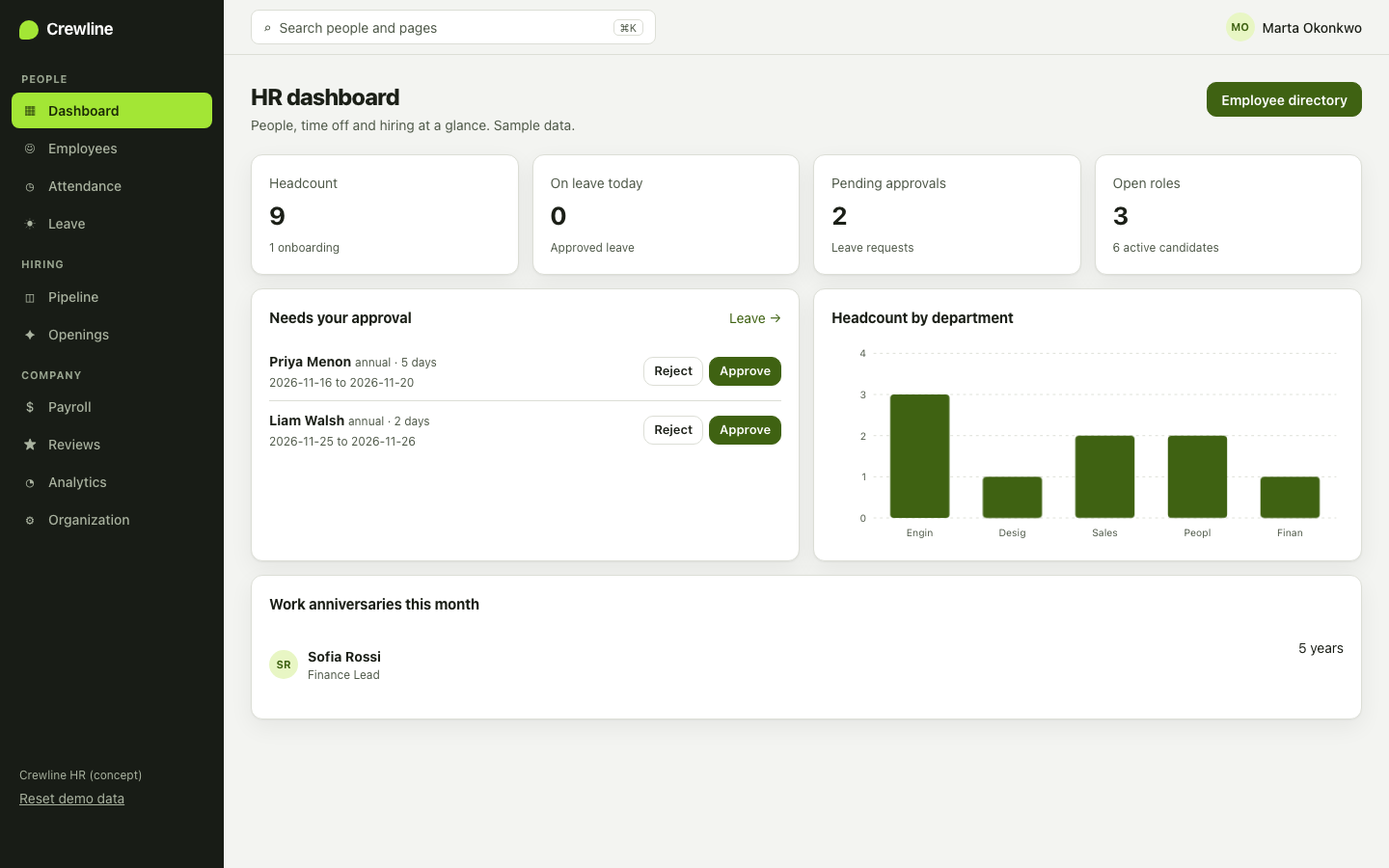
The product page, leading into the dashboard and leave.
Sample data only. Everything you change stays in your browser.
17Design system
#181c16Sidebar and structure#a3e635Active navigation#3f6212Primary actions#0ea5e9Leave#f59e0bPending and days offType. A neutral sans with strong heading weight and tabular numerals for pay.
The stack, the architecture and how it scales.
+Technology choices
Each choice follows from what this product needs. We do not use a tool because it is fashionable.
| Layer | Choice | Why |
|---|---|---|
| Frontend | Next.js, React, TypeScript, Tailwind CSS | Role-aware, accessible screens with server-rendered reports. |
| Backend | Java with Spring Boot | Strict validation, decimal arithmetic and strong security tooling suit payroll and policy. |
| Database | PostgreSQL | Relational integrity and append-only history for sensitive data. |
| Cache and jobs | Redis | Notifications and scheduled job coordination. |
| AI | Claude behind a data-minimising gateway | Drafting and Q&A help with logging and redaction. |
| Cloud | AWS with Docker and CI/CD | Regional hosting for data residency. |
18Frontend architecture
A Next.js application with role-aware navigation, so employees, managers and HR each see the right screens.
Dates, currencies and policies are localised, and the calendar handles different week starts.
19Backend architecture
A Spring Boot service in Java, organised around people, time, payroll and talent modules. Java suits payroll arithmetic and the strict validation HR rules need.
Policies are data, and a rules component evaluates leave and payroll against them.
20Database architecture
PostgreSQL holds people, time, leave, payroll and hiring data. Salary history and reviews are append-only, so changes are auditable.
Money is stored as integer minor units.
employeesidnameroledepartment_idmanager_idstart_datestatuscompensationemployee_idsalary_minoreffective_fromAppend-only history of salary changes
leave_requestsidemployee_idtypefromtodaysstatusattendanceemployee_iddateclock_inclock_outpay_runsidperiodstatusrun_atpayslipspay_run_idemployee_idgross_minortax_minorpension_minornet_minorapplicantsidjob_idstagerating21API structure
A versioned REST API with role-based authorisation on every route. Sensitive endpoints, such as payslips, return only what the caller may see.
/v1/employeesDirectory with filters/v1/leave-requestsRequest leave, validating balance and overlaps/v1/leave-requests/:idApprove or reject/v1/attendance/clockClock in or out/v1/payroll/:periodPayslips for a period/v1/payroll/:period/runRun payroll and lock the period/v1/applicants/:idMove stage, converting a hire/v1/reviewsCreate or complete a review22AI integrations
A model drafts a job description from a role brief and the company's style.
Guardrail. HR edits and approves, and wording is checked for biased language.
Summarises a CV against the role's stated requirements, with the evidence quoted.
Guardrail. Never used to reject a candidate automatically, and it shows the passages it relied on.
Retrieval over the handbook answers questions like "how many sick days do I have?".
Guardrail. Answers cite the policy page and refer unusual cases to HR.
23Security considerations
Single sign-on with multi-factor authentication for HR and finance roles.
Salary, review and medical-leave data are visible only to named roles, and managers see their own reports.
Reads and changes of sensitive fields are logged and cannot be edited.
Encryption in transit and at rest, with field-level encryption for salary and identity numbers.
Server-side validation of dates, amounts and policies, with decimal-safe money handling.
Retention rules per country, data export and deletion tools, designed for regulations such as GDPR.
Candidate data sent to a model is minimised, and decisions are always made by people.
24Infrastructure and deployment
Containers on AWS in regions chosen for data residency. Payroll runs happen in a controlled job with an approval step.
This is the proposed design. Nothing is running.
25Scalability strategy
How it would ship, and what comes after.
26Development roadmap
Phases show order, not dates. A real plan would add timing after discovery.
27Future improvements
Tell us the idea. After a 30-minute call you get a written product plan within an hour.